PULTRACK POS · Live
Run all your shops as one business — even when the internet's down.
Pultrack POS runs your registers, inventory and real double-entry books on your own computer, and syncs every branch to head office. Kassa. Ammar. Hasap.
- Scan-to-sell, cash or credit, 80mm thermal receipts
- FIFO stock by lot across multiple warehouses
- Balance sheet, P&L, dual TMT/USD with frozen rates
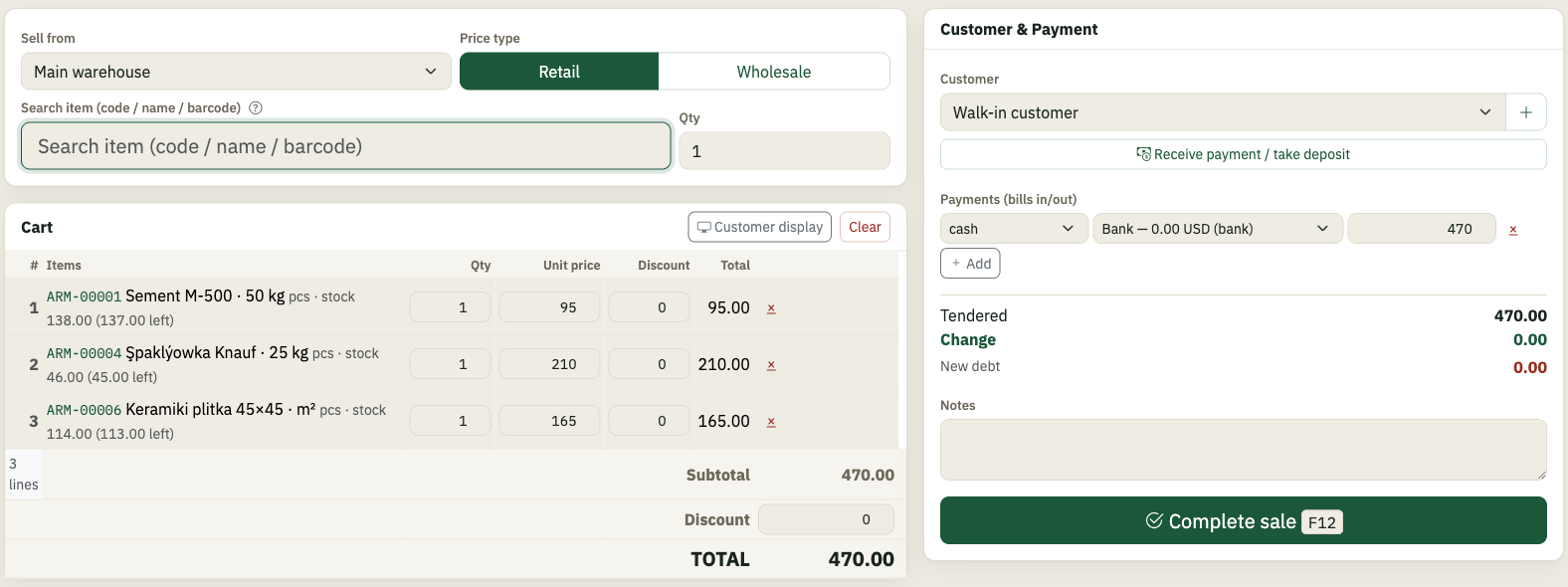
Sell fast at the till
Scan a barcode or search by name, take cash or put it on the customer’s account, and hand over an 80 mm thermal receipt — in seconds, even with a queue at the counter.
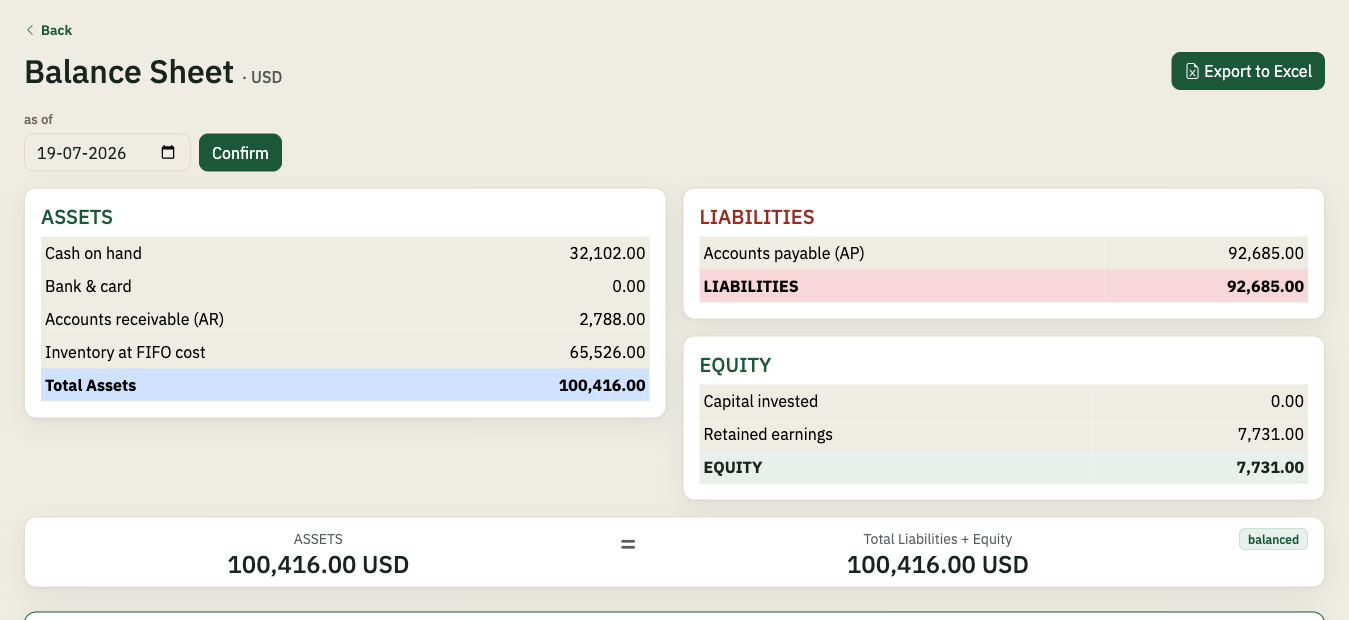
Books that actually balance
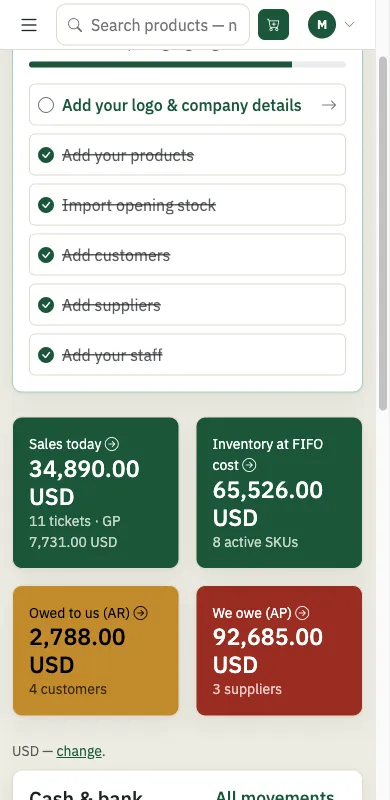
Every sale, purchase and expense posts real double-entry records. Balance sheet, P&L and customer statements are always one click away — in two currencies with locked exchange rates.
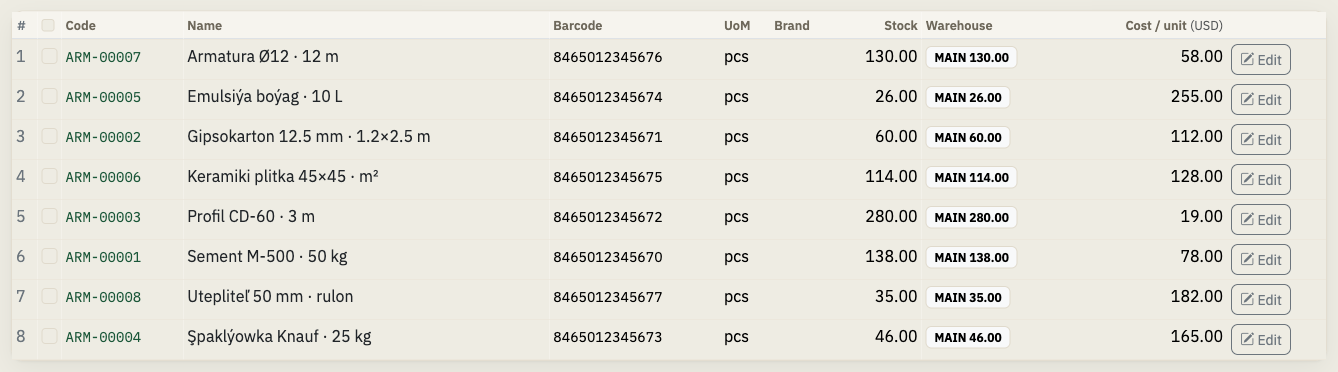
Stock that can’t lie
FIFO lots track what you paid for every unit. Multiple warehouses, stock counts with an audit trail, and inventory that never goes negative.
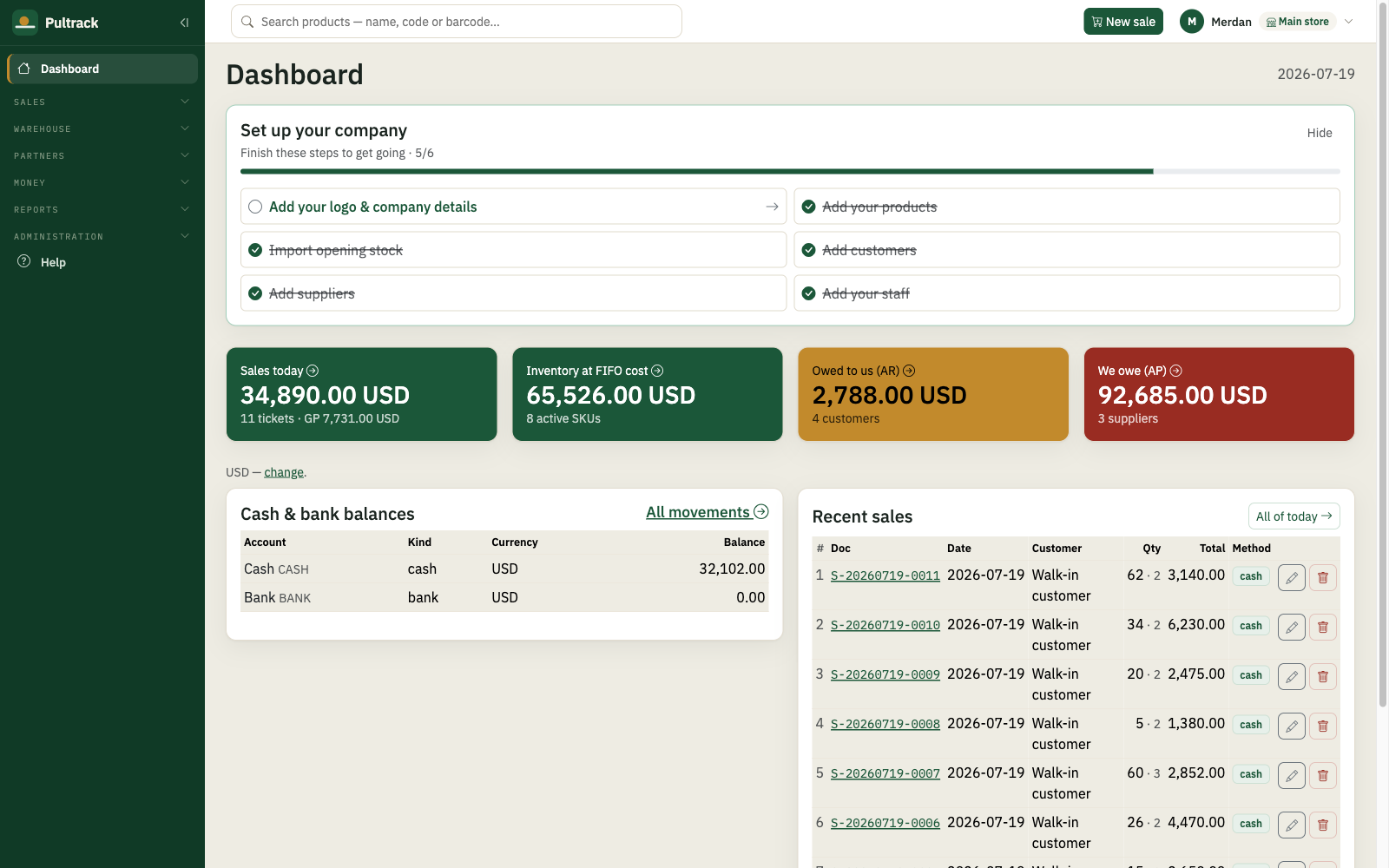
Every branch, one business
Each store runs on its own computer — no internet required. Branches sync to head office when a connection appears, and your books are mirrored to the cloud so you can check the shop from anywhere.

Bring customers back
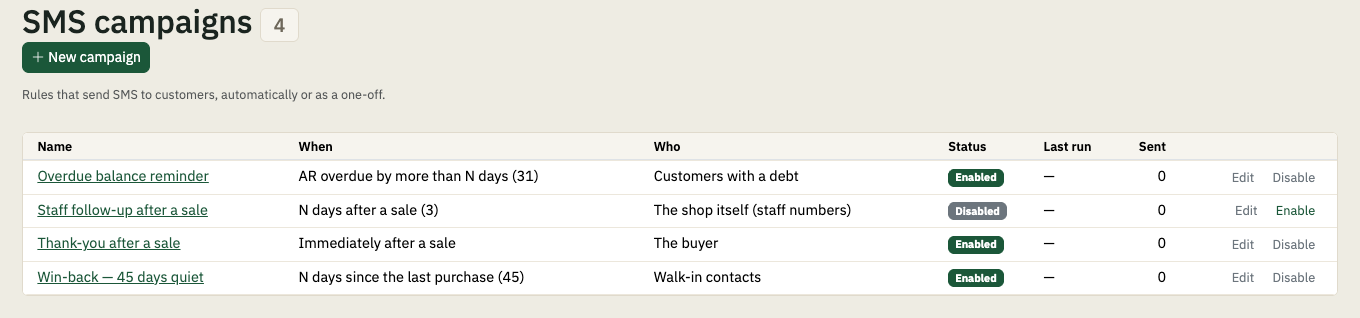
Take a phone number at the till and the points look after themselves — your own earn rate, by category or by item. Then the messages send themselves: a win-back when a regular stops coming, a reminder when a debt runs late — through an Android phone on your counter, no SMS provider needed.
Works where the internet doesn’t
Pultrack is built for markets where the connection drops daily. The till never stops, reports never wait, and nothing is lost — the cloud copy simply catches up when you’re back online.
Everything else in the box
No modules, no add-ons, no per-feature pricing — one licence turns all of it on.
Selling & customers
- Customer ordersTake an order now and fulfil it in parts later; print it for the customer. Open, partial, fulfilled or cancelled at a glance.
- Returns, both waysTake goods back from a customer, or send them back to a supplier — at the cost they actually came in at.
- Customer displayA second screen facing the customer, showing the basket as it is rung up.
- The till in your pocketSell and receive stock from a phone on the shop's own network, with the computer still keeping the books.
- Customer and supplier ledgersStatements, aging and credit days per party: who owes you, how long it has been, and who to call first.
- Card approvals chasedCard sales missing their terminal approval code, listed — so "optional" never quietly becomes "never filled in".
Stock & catalogue
- PurchasesEnter the supplier's bill once and the stock, the cost and what you owe all move together.
- Serial numbersSwitch on serial tracking and every unit carries its own number, from the purchase to the customer who bought it, and back again on a return.
- Stock countsCount a warehouse, see the variance, and post it — shrinkage lands in the accounts, not in a note.
- Transfers between shopsMove stock between branches, or let a branch request it and head office approve.
- BackordersSold something you did not have? The oversell is approved, listed, and turns into a pre-filled purchase.
- What to buyA reorder list built from what actually sold, next to the stock that is not moving.
- Units and categoriesSell by piece, metre, kilo or box, and group items the way your shop already talks about them.
- Barcode labelsPrint shelf and product labels for the items you just received.
Money
- Your own journal entriesPost a double-entry journal when something fits no form — and void it with a trail.
- Your own chart of accountsAdd, rename or switch off accounts so the books match how you think.
- Cash and bank accountsEvery till, safe and bank account with its own running balance, and adjustments that leave a trail.
- Payments and receiptsTake money in or pay it out against a debt, and hand over a printed receipt.
- ExpensesRent, transport, wages, bank charges — recorded once, landing straight in the profit and loss.
- Partners and sharesWhat each partner put in and took out, the ownership split, and retained earnings allocated by share. Admin-only out of the box.
- Two currenciesTMT and USD side by side, with the rate frozen on each document so history never moves.
People
- Staff accounts and rolesAdmin, manager, cashier and viewer. A cashier rings up sales and never opens a report.
- Hiring to leavingAdd staff, terminate, rehire — and record salaries and bonuses straight into the books.
Running the shop
- The full picture of your companyProfit and loss, what you own against what you owe, where the money actually went, which items pay and which do not, and who still owes you. Every report exports to Excel.
- Start from your spreadsheetsBring in opening stock, items, contacts and supplier bills from Excel instead of typing them twice.
- Message outboxEvery SMS with its delivery state, and a requeue button for the ones that did not land.
- Backup and audit trailEvery change logged with who made it, and your whole book is one file you can copy.
- API keysIssue a key so another system can read or post to your shop, and revoke it when you are done.
- Nine languagesEach user picks their own; the till and the back office both follow.
- 01Download the app
- 02Name your shop, set your password
- 03Add a product, ring a sale
Download free — 30-day trial
Everything included. No card, no account online — download and sell.
The Windows download is a ZIP: unzip it, run Pultrack_Setup.exe on the PC, and copy the included SMS Gateway app to an Android phone if you want to send SMS campaigns.
Windows may show a SmartScreen warning for new downloads: click “More info”, then “Run anyway”. On macOS: right-click the app and choose “Open” the first time.
Try it
Everything included. No card, no account online — download and sell.
1 year
All features, all updates, support in your language.
2 years
Same as yearly — two years locked in.
- Pay through your local agent, in USDT, or by bank transfer.
- When a license runs out the app switches to read-only — your data is never held hostage.
- One licence covers one shop — a location, not a computer. Run as many tills there as you need.
- More than one shop? Chain pricing by agreement.
Try it
Everything included. No card, no account online — download and sell.
1 month
Pay month to month. Same features as the yearly plan — switch whenever you want.
1 year
All features, all updates, support in your language.
More than one shop
| per month | per year | |
|---|---|---|
| 1 shop | 200 TMT | 2100 TMT |
| 2 shops | 350 TMT | 3700 TMT |
| 3 shops | 470 TMT | 5000 TMT |
| each shop after | +120 TMT | +1300 TMT |
Each shop bills at its own step, added together — the totals above are the full price. 10 shops or more: by agreement.
- Pay in manat — cash, bank transfer, or through your agent.
- When a license runs out the app switches to read-only — your data is never held hostage.
- One licence covers one shop — a location, not a computer. Run as many tills there as you need.
Does it really work without internet?
Yes — everything runs on your own computer. Internet is only used for the cloud copy and branch sync, whenever it happens to be available.
Where is my data?
In a database file on your PC. An encrypted copy is kept on Pultrack’s server for disaster recovery — only your shop can be restored from it.
Can I run several shops?
Yes. Each branch runs its own Pultrack and syncs to head office; the owner sees every branch in one dashboard.
What languages does it speak?
The app runs in nine languages — English, Russian, Turkmen, Turkish, Uzbek, Kazakh, Kyrgyz, Azerbaijani and Tajik — switchable per user, any time.
Which receipt printers work?
Any standard 80 mm ESC/POS thermal printer — the kind sold in every bazaar electronics row.
What happens when the trial ends?
The app keeps opening and shows all your data, but new sales pause until you activate. Nothing is deleted, ever.
Can I see my shop from my phone?
Yes — your books are mirrored to pos.pultrack.com, read-only, current as of the shop PC’s last connection. Sign in with your shop username and password.
Can it text my customers?
Yes — and without signing up to an SMS provider. The download includes an SMS Gateway app for an Android phone: keep that phone on the shop's network with your own SIM in it, and Pultrack sends through it. Win-backs when a regular stops coming, overdue-debt reminders, or a one-off broadcast — with quiet hours, a daily cap and opt-out built in.
Can my cashier see my profit?
No. Pultrack has four levels of access — admin, manager, cashier and viewer — checked on every screen, not just hidden from a menu. A cashier rings up sales and receives stock, and never opens a report. Even a manager, who can open the reports, cannot open the shareholder page: what each partner put in and what they own stays with you, unless you hand someone the key.